

Wan FLF2V (First-Last Frame Video Generation) is an open-source video generation model developed by the Alibaba Tongyi Wanxiang team. Its open-source license is Apache 2.0. Users only need to provide two images as the starting and ending frames, and the model automatically generates intermediate transition frames, outputting a logically coherent and naturally flowing 720p high-definition video. Core Technical HighlightsDocumentation Index
Fetch the complete documentation index at: https://dripart-mintlify-e28287af.mintlify.app/llms.txt
Use this file to discover all available pages before exploring further.
- Precise First-Last Frame Control: The matching rate of first and last frames reaches 98%, defining video boundaries through starting and ending scenes, intelligently filling intermediate dynamic changes to achieve scene transitions and object morphing effects.
- Stable and Smooth Video Generation: Using CLIP semantic features and cross-attention mechanisms, the video jitter rate is reduced by 37% compared to similar models, ensuring natural and smooth transitions.
- Multi-functional Creative Capabilities: Supports dynamic embedding of Chinese and English subtitles, generation of anime/realistic/fantasy and other styles, adapting to different creative needs.
- 720p HD Output: Directly generates 1280×720 resolution videos without post-processing, suitable for social media and commercial applications.
- Open-source Ecosystem Support: Model weights, code, and training framework are fully open-sourced, supporting deployment on mainstream AI platforms.
- DiT Architecture: Based on diffusion models and Diffusion Transformer architecture, combined with Full Attention mechanism to optimize spatiotemporal dependency modeling, ensuring video coherence.
- 3D Causal Variational Encoder: Wan-VAE technology compresses HD frames to 1/128 size while retaining subtle dynamic details, significantly reducing memory requirements.
- Three-stage Training Strategy: Starting from 480P resolution pre-training, gradually upgrading to 720P, balancing generation quality and computational efficiency through phased optimization.
- GitHub Repository: GitHub
- Hugging Face Model Page: Hugging Face
- ModelScope Community: ModelScope
Wan2.1 FLF2V 720P ComfyUI Native Workflow Example
1. Download Workflow Files and Related Input Files
Please download the WebP file below, and drag it into ComfyUI to load the corresponding workflow. The workflow has embedded the corresponding model download file information. Please download the two images below, which we will use as the starting and ending frames of the video


2. Manual Model Installation
If corresponding All models involved in this guide can be found here. diffusion_models Choose one version based on your hardware conditions Choose one version from Text encoders for download, VAE CLIP Vision File Storage Location3. Complete Workflow Execution Step by Step
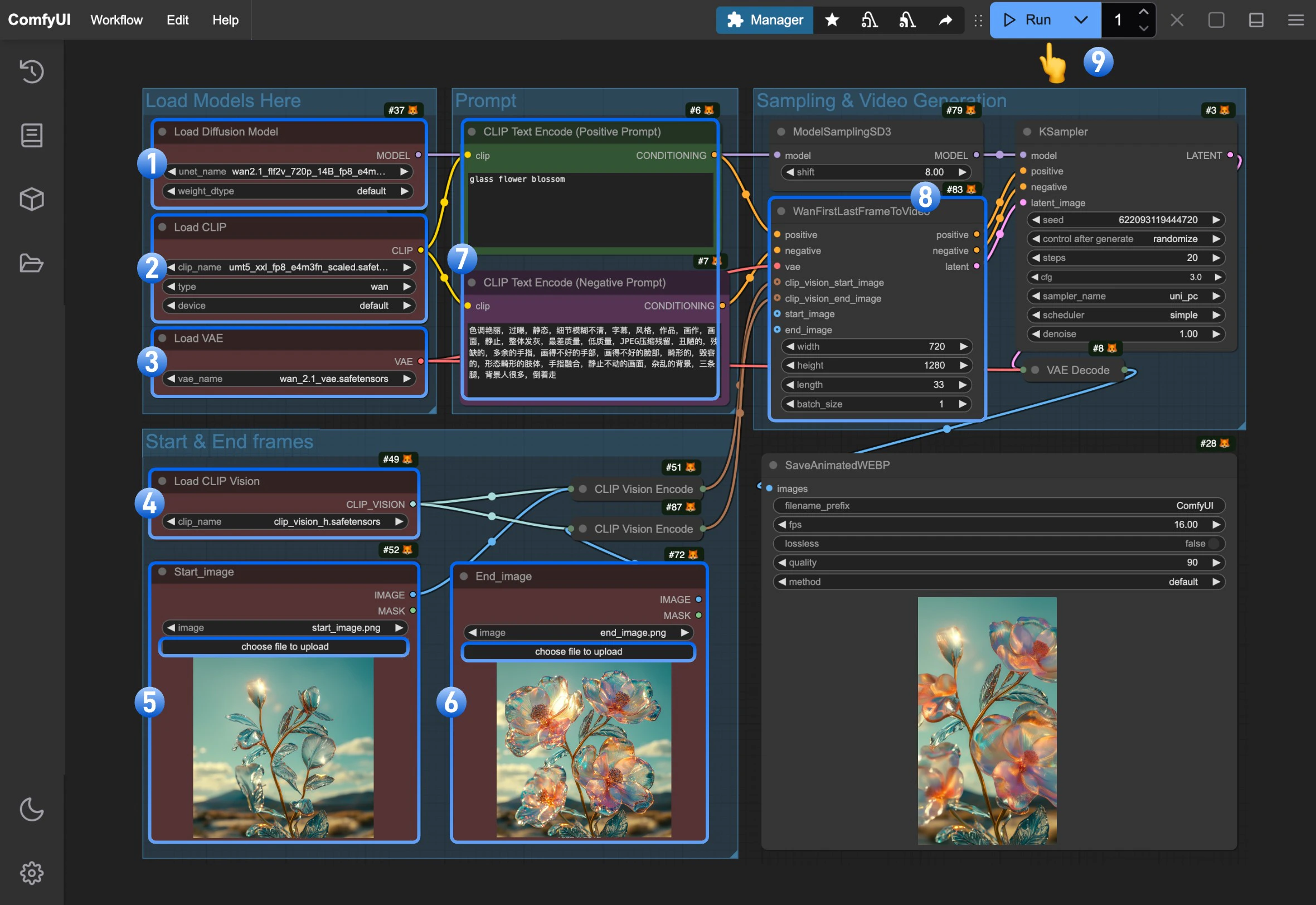
- Ensure the
Load Diffusion Modelnode has loadedwan2.1_flf2v_720p_14B_fp16.safetensorsorwan2.1_flf2v_720p_14B_fp8_e4m3fn.safetensors - Ensure the
Load CLIPnode has loadedumt5_xxl_fp8_e4m3fn_scaled.safetensors - Ensure the
Load VAEnode has loadedwan_2.1_vae.safetensors - Ensure the
Load CLIP Visionnode has loadedclip_vision_h.safetensors - Upload the starting frame to the
Start_imagenode - Upload the ending frame to the
End_imagenode - (Optional) Modify the positive and negative prompts, both Chinese and English are supported
- (Important) In
WanFirstLastFrameToVideowe use 7201280 as default size.because it’s a 720P model, so using a small size will not yield good output. Please use size around 7201280 for good generation. - Click the
Runbutton, or use the shortcutCtrl(cmd) + Enterto execute video generation