

Documentation Index
Fetch the complete documentation index at: https://dripart-mintlify-e28287af.mintlify.app/llms.txt
Use this file to discover all available pages before exploring further.
About Wan2.1-Fun-InP
Wan-Fun InP is an open-source video generation model released by Alibaba, part of the Wan2.1-Fun series, focusing on generating videos from images with first and last frame control. Key features:- First and last frame control: Supports inputting both first and last frame images to generate transitional video between them, enhancing video coherence and creative freedom. Compared to earlier community versions, Alibaba’s official model produces more stable and significantly higher quality results.
- Multi-resolution support: Supports generating videos at 512×512, 768×768, 1024×1024 and other resolutions to accommodate different scenario requirements.
- 1.3B Lightweight: Suitable for local deployment and quick inference with lower VRAM requirements
- 14B High-performance: Model size reaches 32GB+, offering better results but requiring higher VRAM
- Wan2.1-Fun-1.3B-Input
- Wan2.1-Fun-14B-Input
- Code repository: VideoX-Fun
Wan2.1 Fun InP Workflow
Download the image below and drag it into ComfyUI to load the workflow:
1. Workflow File Download
2. Manual Model Installation
If automatic model downloading is ineffective, please download the models manually and save them to the corresponding folders. The following models can be found at Wan_2.1_ComfyUI_repackaged and Wan2.1-Fun Diffusion models - choose 1.3B or 14B. The 14B version has a larger file size (32GB) and higher VRAM requirements:- wan2.1_fun_inp_1.3B_bf16.safetensors
- Wan2.1-Fun-14B-InP: Rename to
Wan2.1-Fun-14B-InP.safetensorsafter downloading
3. Complete the Workflow Step by Step
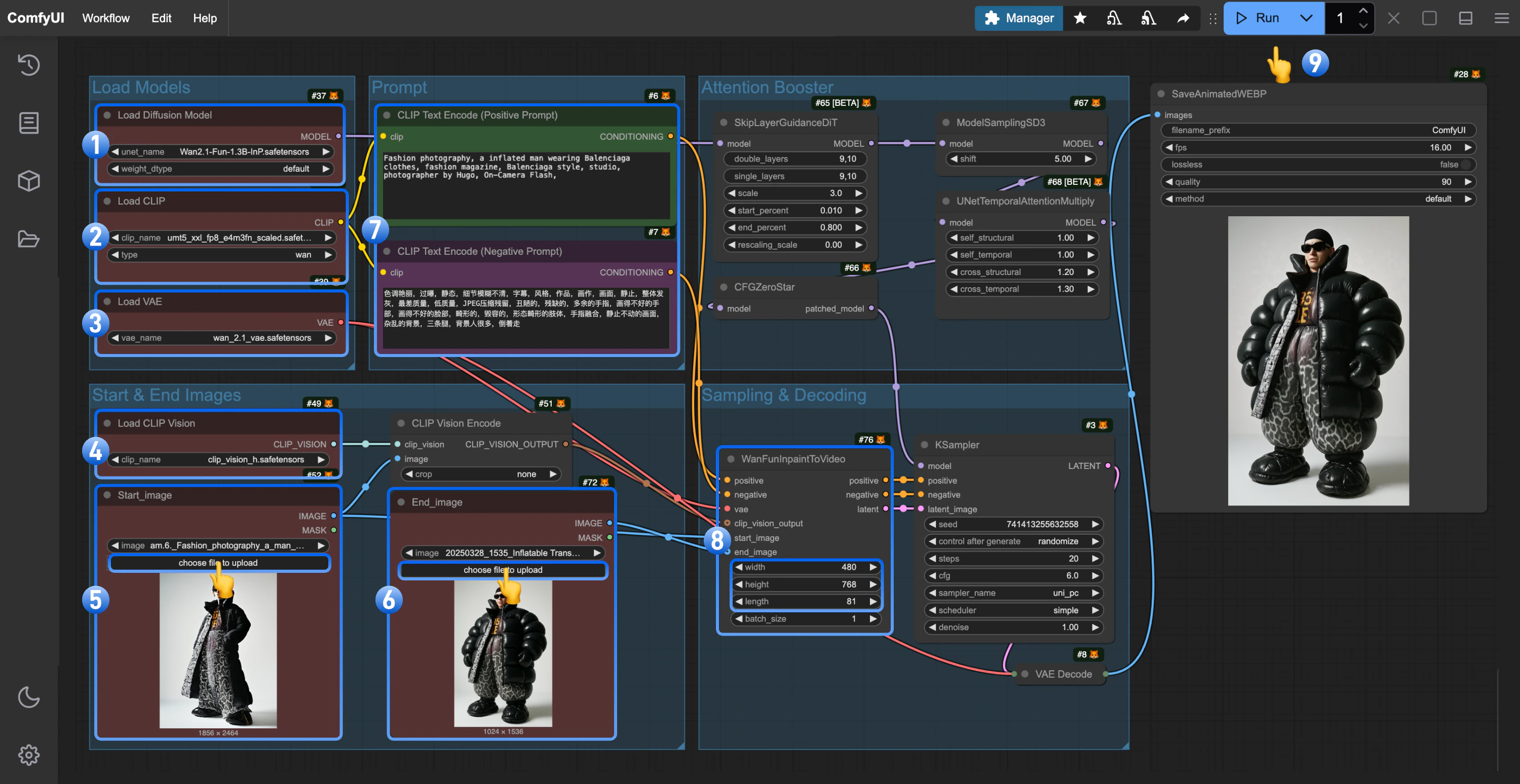
- Ensure the
Load Diffusion Modelnode has loadedwan2.1_fun_inp_1.3B_bf16.safetensors - Ensure the
Load CLIPnode has loadedumt5_xxl_fp8_e4m3fn_scaled.safetensors - Ensure the
Load VAEnode has loadedwan_2.1_vae.safetensors - Ensure the
Load CLIP Visionnode has loadedclip_vision_h.safetensors - Upload the starting frame to the
Load Imagenode (renamed toStart_image) - Upload the ending frame to the second
Load Imagenode - (Optional) Modify the prompt (both English and Chinese are supported)
- (Optional) Adjust the video size in
WanFunInpaintToVideo, avoiding overly large dimensions - Click the
Runbutton or use the shortcutCtrl(cmd) + Enterto execute video generation
4. Workflow Notes
- When using Wan Fun InP, you may need to frequently modify prompts to ensure the accuracy of the corresponding scene transitions.